A Small Pit Works Better When the Track Leaves Room for the Players
By Broadwaytrax Content Studio · July 10, 2026
A backing track does not have to replace every live musician.
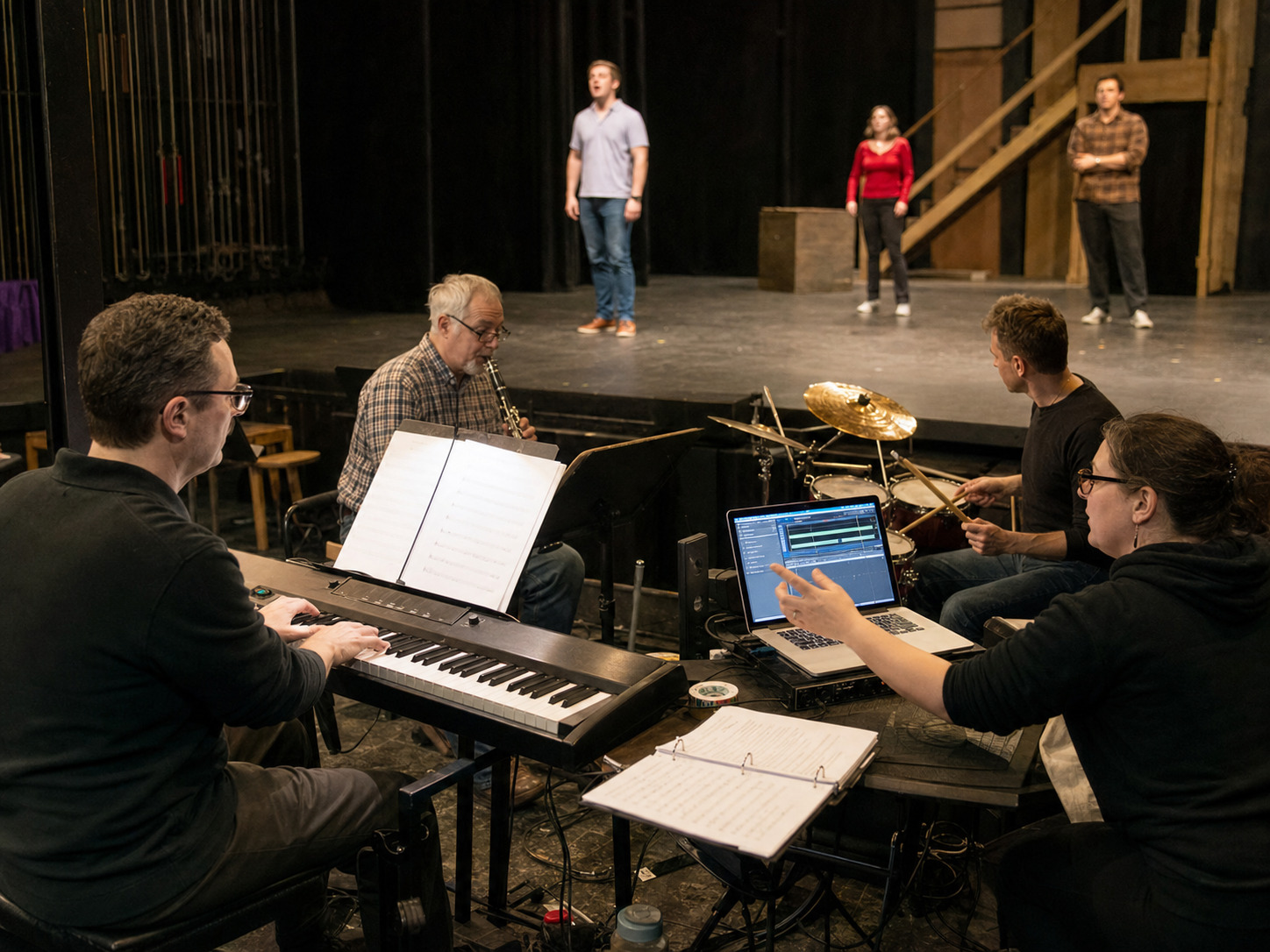
For a school, community theater, youth program, or small professional production, the useful middle ground may be a keyboard player, one or two additional musicians, and a track that covers the parts the room cannot staff. That setup can feel flexible and alive, but only when the track is arranged around the people who are actually playing.
If the live pit and the recording compete for the same space, the mix gets crowded. If neither one clearly owns the tempo or cue, the cast feels the uncertainty immediately.
Start with the players you really have
Do not build the plan around the pit you wish you had. List the musicians who are confirmed, the instruments they will play, and the jobs they need to own.
A practical small-pit map might look like this:
| Live role | What the player can lead | What the track may need to support |
|---|---|---|
| Keyboard | Harmony, underscoring, vamps, flexible transitions | Percussion, bass, orchestral color, fixed dance sections |
| Percussion | Energy, accents, scene-change timing | Sustained instruments, bass, harmony, specialty colors |
| Reed or brass | Character, exposed lines, live breath and phrasing | Rhythm section, strings, additional winds or brass |
| Music director | Starts, cutoffs, tempo decisions, recovery | Consistent arrangement, missing sections, repeatable cues |
The goal is not to make every instrument audible at once. The goal is to decide which musical information must stay live and which parts can be dependable inside the recording.
Avoid doubling the same musical job
Doubling can add strength, but accidental doubling often adds confusion.
If the track already contains a prominent piano part and the live keyboardist plays the same voicing, the harmony may feel heavy. If the recorded percussion and live drummer both own every fill, the groove can blur. If the track carries a solo reed line while a live player phrases it differently, the audience may hear two interpretations instead of one.
Before rehearsal, ask:
- Which instrument owns the intro?
- Which source owns the tempo?
- Are any featured lines duplicated?
- Can the track be mixed without covering the live players?
- Does the live musician need room for rubato, a vamp, or an extra bar?
When a standard catalog track is close but too full, (custom track work) can help shape keys, cuts, tempos, cues, lead-ins, orchestration, and full-show support around the actual production.
Decide who controls the tempo
A hybrid pit needs one clear tempo authority.
For a fixed dance number, the track may establish the pulse and the live players follow it. For a solo with flexible phrasing, the music director or keyboard player may need more control, which can require a different track design, a longer lead-in, or a planned rubato section.
Write the decision into the rehearsal plan:
- Who starts the number?
- What does the cast listen for?
- Does the conductor follow the track or lead the track?
- Where can the tempo breathe?
- What happens if the stage cue is late?
Do not leave those questions for tech week. The cast should rehearse the same tempo relationship it will use in performance.
Give every cue one owner
A small live pit can recover from a missed entrance. A fixed recording cannot guess what happened onstage.
That makes cue ownership essential. The stage manager, music director, keyboardist, or playback operator should know who calls each start, stop, fade, and transition. If a scene routinely runs long, solve it with an intentional vamp, button, or cue edit instead of hoping the operator can chase the stage.
Use a simple cue table:
| Moment | Cue owner | Playback plan | Live-player plan |
|---|---|---|---|
| Opening number | Stage manager | Start after house fade | Keyboard confirms first cast entrance |
| Dance break | Music director | Fixed track section | Percussion follows recorded pulse |
| Scene change | Stage manager | Vamp until visual cue | Keyboard sustains or repeats approved figure |
| Finale | Music director | Full track to final button | Live players reinforce ending and cutoff |
For a deeper operating checklist, use the Broadwaytrax guide to building a (backing-track cue sheet before tech).
Rehearse the blend, not only the notes
The first full rehearsal should answer mix questions, not just musical ones.
Listen from the audience area and confirm:
- the cast can hear the pulse and first entrance;
- live players remain present instead of disappearing under the track;
- recorded and live low frequencies do not make the room muddy;
- dialogue can begin without fighting a long ending;
- microphones are not pushing performers to sing against the mix;
- the playback operator can find and stop every file quickly.
A track that sounds balanced in headphones may behave differently in an auditorium, cafeteria, black box, or outdoor venue. Test the real playback device, mixer, speakers, microphones, and musicians together.
Keep rehearsal and performance versions obvious
The cast may need a guide vocal or fuller reference track early in rehearsal. The performance version should be labeled so clearly that nobody can start the wrong file.
Keep the active folder simple:
- one approved performance file per cue;
- a separate rehearsal folder for guide vocals;
- key, cut, and version date in every file name;
- a backup copy stored offline;
- the same playlist order on the primary and backup device.
If the production is still choosing standard material, browse (Broadwaytrax accompaniment tracks) before deciding which numbers need custom hybrid-pit work.
FAQ: live musicians and backing tracks
Can a musical use backing tracks and live musicians together?
Yes. The setup works best when the arrangement clearly separates the parts played live from the parts carried by the recording, and when one person owns tempo and playback cues.
Should the keyboard player play along with the track?
Only when the parts fit together intentionally. A live keyboard can add flexibility, but duplicating a full recorded piano part may crowd the harmony or make the attack feel uneven.
What should we send for a custom small-pit track?
Share the show and song, confirmed live instruments, desired key and cut, tempo notes, cue points, vamps, lead-ins, endings, and any recorded parts that should be reduced or emphasized.
When should the full hybrid pit rehearse together?
Early enough to correct arrangement, mix, and cue problems before tech. At minimum, run the actual playback setup with the live players before the cast depends on it.
Build a track around the musicians, cues, keys, cuts, and orchestration your production will actually use. Broadwaytrax can help shape custom tracks and full-show packages for a practical rehearsal and performance plan.
Plan a Custom TrackThe takeaway
A small pit does not need a track that plays everything. It needs a track that fills the right gaps, leaves room for live choices, and makes cue ownership obvious. Map the musicians first, decide who controls tempo, rehearse the real blend, and customize the recording when the standard version does not fit the players in the room.