A Cue-to-Cue Should Test the Handoffs, Not Rehearse the Whole Show
By Broadwaytrax Content Studio · August 4, 2026
Updated August 4, 2026
A cue-to-cue rehearsal is where the production proves that every transition can actually happen. It is not the night to sing every verse, repeat every scene, or discover that the playback operator has three files called final.
With backing tracks, the useful question is simple: can the team move from the spoken cue into the correct audio, land the entrance, reach the planned stop, reset, and do it again?
Build that answer before the room is waiting.
What is a cue-to-cue rehearsal?
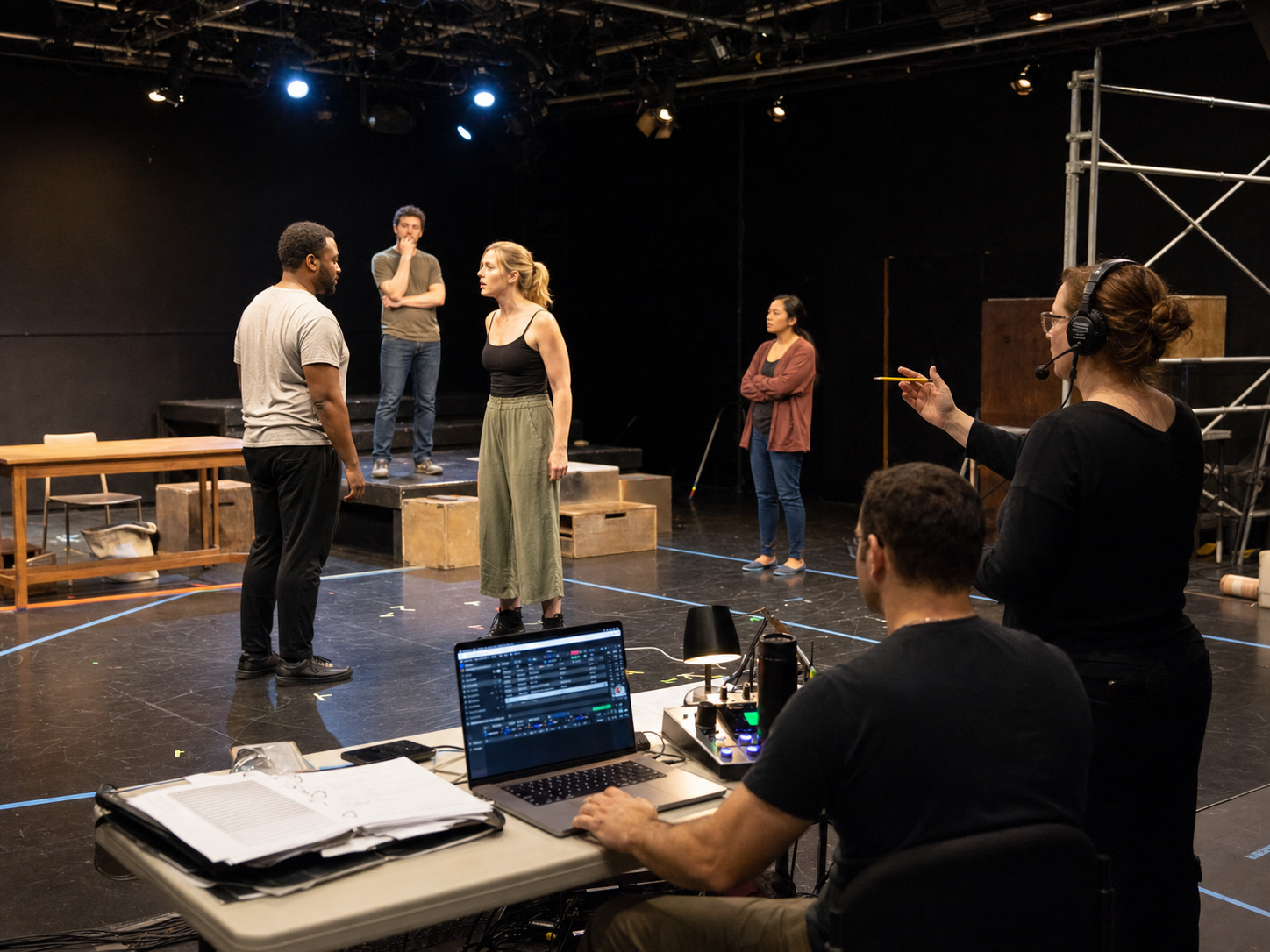
A cue-to-cue, often shortened to Q2Q, rehearses the technical handoffs around a production instead of running every scene in full. The team moves from one important cue to the next so lighting, sound, projections, scenery, performers, stage management, and playback can test their shared timing.
For a tracked musical, that includes more than pressing play. The rehearsal should confirm:
- which line, movement, or stage-management call starts the file;
- how much introduction the performers hear;
- where the first live entrance sits;
- whether dialogue overlaps or clears the music;
- what happens at a button, fade, cutoff, vamp, or transition;
- and how the team restarts after a correction.
The goal is not a polished performance. The goal is a repeatable technical sequence.
Start with a cue map, not the playlist
A show-order playlist tells the operator what comes next. A cue map tells the whole team why and when it happens.
Give each musical event one row:
| Cue | Trigger | Track | First live entrance | Planned ending | Reset point |
|---|---|---|---|---|---|
| SQ 12 | Stage manager calls after the final line | Approved overture cut | No live vocal | Full button | Top of the last phrase |
| SQ 18 | Performer reaches the marked position | Scene-change transition | Dialogue begins after the two-bar lead-in | Fade on clear | Start of transition |
| SQ 31 | Conductor or music director nod | Act-one finale | Ensemble pickup after four counts | Full ending | Second-verse pickup |
Use the cue numbers already established by stage management. If the sound operator, director, and stage manager are using different labels, resolve that before the rehearsal begins.
The (first read-through track plan) helps build the show-order map earlier in the process. The cue-to-cue version should now be narrower, technical, and approved.
Give every file one technical job
The Q2Q folder should contain only files the room might actually call.
Keep out:
- guide-vocal files that are no longer part of rehearsal;
- superseded keys or cuts;
- full songs when the production uses a shortened version;
- rehearsal exports with spoken notes in the audio;
- alternate endings that have not been approved;
- and mystery copies named
new,latest, oruse-this.
Use filenames that expose the cue and version without opening the file:
SQ18_SceneChange_KeyD_Approved_2026-08-04.mp3
The date is useful during technical work because it makes a replacement visible. Once the show locks, keep one approved performance version and archive the older exports outside the live playback folder.
If the production needs a different key, cut, tempo, lead-in, vamp, cue point, or ending, (Broadwaytrax custom tracks) can shape the audio around the actual staging plan.
Test the five seconds before the music
Most cue problems begin before anyone hears the first note.
For every track, rehearse this sequence:
- The stage manager identifies the next cue.
- The operator confirms the exact file is ready.
- Performers and moving scenery reach the agreed position.
- The triggering line, gesture, light state, or call happens.
- The operator starts the file once.
Do not let several people call the same cue. The director may describe the adjustment, but the production should still use one agreed start authority during the run.
Then ask whether the introduction gives the performer enough information. A track can be musically correct and still be hard to enter if the cue begins on an exposed note, hides the pickup under movement noise, or leaves no time to breathe.
Rehearse dialogue-to-music handoffs
Spoken-to-sung transitions are where a tracked production can feel either intentional or mechanical.
Check:
- the exact last spoken word before the track;
- whether the actor moves before or after the cue;
- how many beats the performer hears;
- whether applause or scene noise may cover the introduction;
- whether a microphone change happens during the lead-in;
- and whether the first sung word needs a stronger musical landmark.
Run the handoff, stop, and name the problem precisely. “It felt late” is not enough. Record whether the trigger was late, the file included too much silence, the operator waited for the wrong landmark, or the performer entered before the intended beat.
That distinction determines whether the solution is rehearsal, cue language, staging, or an audio edit.
Check buttons, fades, vamps, and stops
The end of a track is also a cue.
For a full button, confirm what the lights, performers, and scenery do on the last musical event. For a fade, name who calls it and how long the fade should take. For a vamp, establish the signal that releases the loop. For a hard stop, make sure the operator is not being asked to guess from an unmarked visual moment.
Use a compact note:
SQ 42: play approved curtain-call file. Hold at the marked vamp until the stage manager calls “GO 43.” Release on the next full measure. Let the final button ring before the light cue.
If the playback file cannot support that sequence reliably, fix the file or revise the staging plan before the next full run.
Build a restart point for every cue
A cue-to-cue rehearsal is made of restarts. The team should not return to the top of a six-minute number to test a ten-second transition.
Choose one useful restart landmark for each cue:
- a spoken line;
- the top of a musical phrase;
- a numbered rehearsal mark;
- the beginning of a transition;
- a clear count before the entrance;
- or a point where scenery and performers can safely reset.
Record both the stage reset and the audio reset. If the operator jumps to the right point but the actor, light, or scenic piece is still in the wrong state, the rehearsal will produce false information.
Decide what does not need to run
A focused Q2Q protects time by skipping material that does not contain a technical question.
Do not automatically play:
- every complete verse after the first entrance is proven;
- a full dance break when only the transition out is being tested;
- dialogue that does not affect a cue;
- repeated choruses with identical technical behavior;
- or a finished number after the team has already verified its start and end.
The director or stage manager can call “hold,” name the next target, and move the room to the required reset point. Everyone should know in advance that stopping is the method, not a sign the rehearsal is failing.
Use the rehearsal report to lock changes
After the Q2Q, turn every track note into a decision with an owner.
Record:
- cue number and filename;
- what happened;
- whether the problem belongs to performance, cueing, equipment, staging, or the audio file;
- the approved change;
- who owns it;
- when the new version is due;
- and who confirms it before the next run.
The (musical-theater rehearsal report guide) gives a fuller process for converting room notes into controlled revisions.
Do not replace a performance file quietly. A new export should return through the same cue map, filename, approval, and backup process.
Keep rights and audio edits separate
A production may need practical changes to make the audio fit the staging, but the ability to edit a recording does not grant permission to change protected show material.
Confirm score, script, cut, lyric, orchestration, and other protected changes with the appropriate publisher, licensing house, or rights holder. Confirm use of the Broadwaytrax recording through the applicable Broadwaytrax license. The (theater-use and grand-rights guide) explains why those permissions are separate.
Cue-to-cue backing-track checklist
- Use stage-management cue numbers on the track map.
- Keep only approved performance files in the live folder.
- Confirm the trigger, introduction, first entrance, and ending.
- Test dialogue-to-music handoffs at real room volume.
- Name who calls every start, fade, vamp release, and stop.
- Give every cue an audio restart point and a stage reset.
- Skip complete sections that do not contain a technical question.
- Record the exact cause of a timing problem.
- Assign every revision to one owner and approval step.
- Test replacements before they enter the performance playlist.
- Keep an offline backup on a second tested device.
FAQ: cue-to-cue rehearsals with backing tracks
Should a cue-to-cue rehearsal play every song in full?
No. Move from one technical handoff to the next. Play enough to test the trigger, entrance, transition, ending, and reset the team needs to verify.
Who should call the track cue?
Use the production's agreed cue-calling structure. In a staged run, that is commonly the stage manager. The director can describe an adjustment, but the operator should not have to choose among competing calls.
What belongs in the Q2Q track folder?
Only approved files the room may call: the correct key, cut, tempo, lead-in, ending, cue label, and version. Move guide vocals, superseded exports, and unapproved alternates elsewhere.
What if a singer keeps missing the first entrance?
Identify the cause before editing. The trigger may be late, the introduction may be unclear, the performer may not hear the monitor, or the file may need a better lead-in. Fix the actual layer that failed.
When is a backing-track revision ready for the next run?
When the new file has a clear version, the requested change has been checked, the cue map is updated, the production owner has approved it, and both the performance device and backup contain the same tested version.
The takeaway
Turn the production cue map into dependable audio with the exact key, cut, tempo, lead-in, vamp, restart point, cue, and ending your stage manager and operator need.
Plan Production-Ready Cue EditsA strong cue-to-cue makes every musical handoff boring in the best way. One person calls the cue, one approved file starts, the performer hears the entrance, the ending behaves as planned, and the whole sequence can reset without argument.
Test the transitions, document the real cause of each problem, and lock revisions before the next full run. That is how backing tracks become part of the production system instead of another technical variable.